StockX Global Pricing
Helping sellers compete in global markets
My RoleLead Product Designer
Seller ToolsTeam2 PMs · Sole Designer · 6 Engineers
Partnered with research & productMobile & web2021 - 2025
Scope01 Context & ChallengeGlobal trade is complex
StockX is a marketplace for current culture where you can buy hype items like sneakers, trading cards and electronics from sellers all around the world. As StockX expanded globally, they needed a mechanism to promote trades between buyers and sellers in the same country over buyers and sellers that were far apart and required expensive duties, taxes and shipping fees. Some marketplaces like eBay have confronted this issue by “geo fencing” or only showing shoppers items that can be sourced from their local area. StockX took a different approach and started adjusting sellers listing prices or Ask prices to include any duties or customs fees that a buyer would need to pay to purchase their item, depending on their location.
This policy, called All-in-Ask, has been great for buyers because any fees they need to pay are included in the price of the item and they are not charged any surprise fees. It has also been very successful for StockX because it has allowed them to reduce shipping costs and expand into more countries. However, it has made it difficult for sellers to know how to price their items competitively. Since seller’s ask price will be displayed at different prices all around the world, they need visibility into how to become the lowest price in each region and make sure their items sell.
Key Problems:
Education
Explaining to sellers that Asks will display differently to buyers in different markets
Flexibility
Helping sellers weigh the trade offs of selling speed and price
Speed
Giving sellers easily digestible recommendations so they can price quickly
02 ExplorationThe Global Data Panel
A core tenet of StockX Pro is efficiency. Professional sellers on StockX usually have hundreds of active listings at any given time and they need to be able to manage them quickly. The listing flow allows sellers to create listings in bulk with just a few clicks. Just search for the item in the StockX catalog, select the sizes and quantities you want to sell and input how much you want to sell them for. We decided to add a new slide out panel to make global market information available for sellers while they are making these critical pricing decisions. I created several different concepts for the information that would be displayed in the panel and we ultimately decided to user test two different options to move forward for user testing.
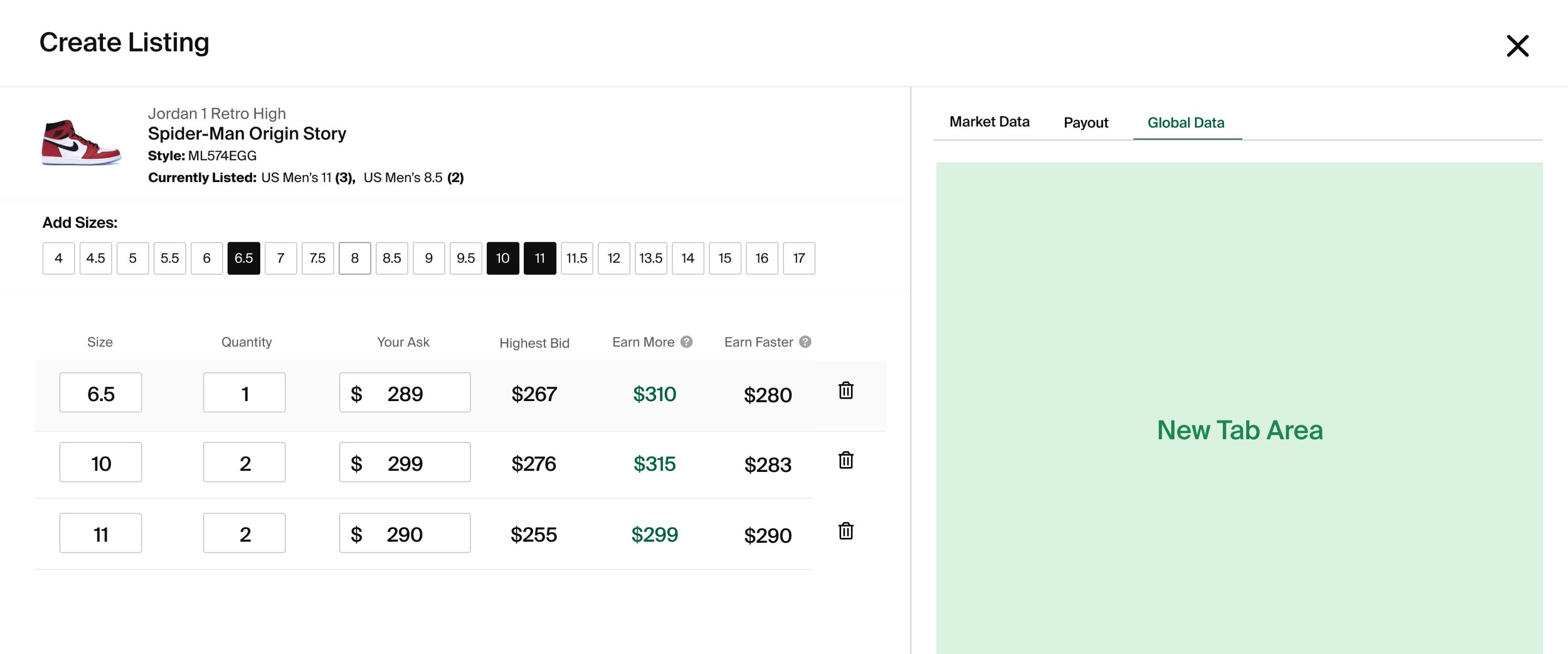
Existing Listing UI
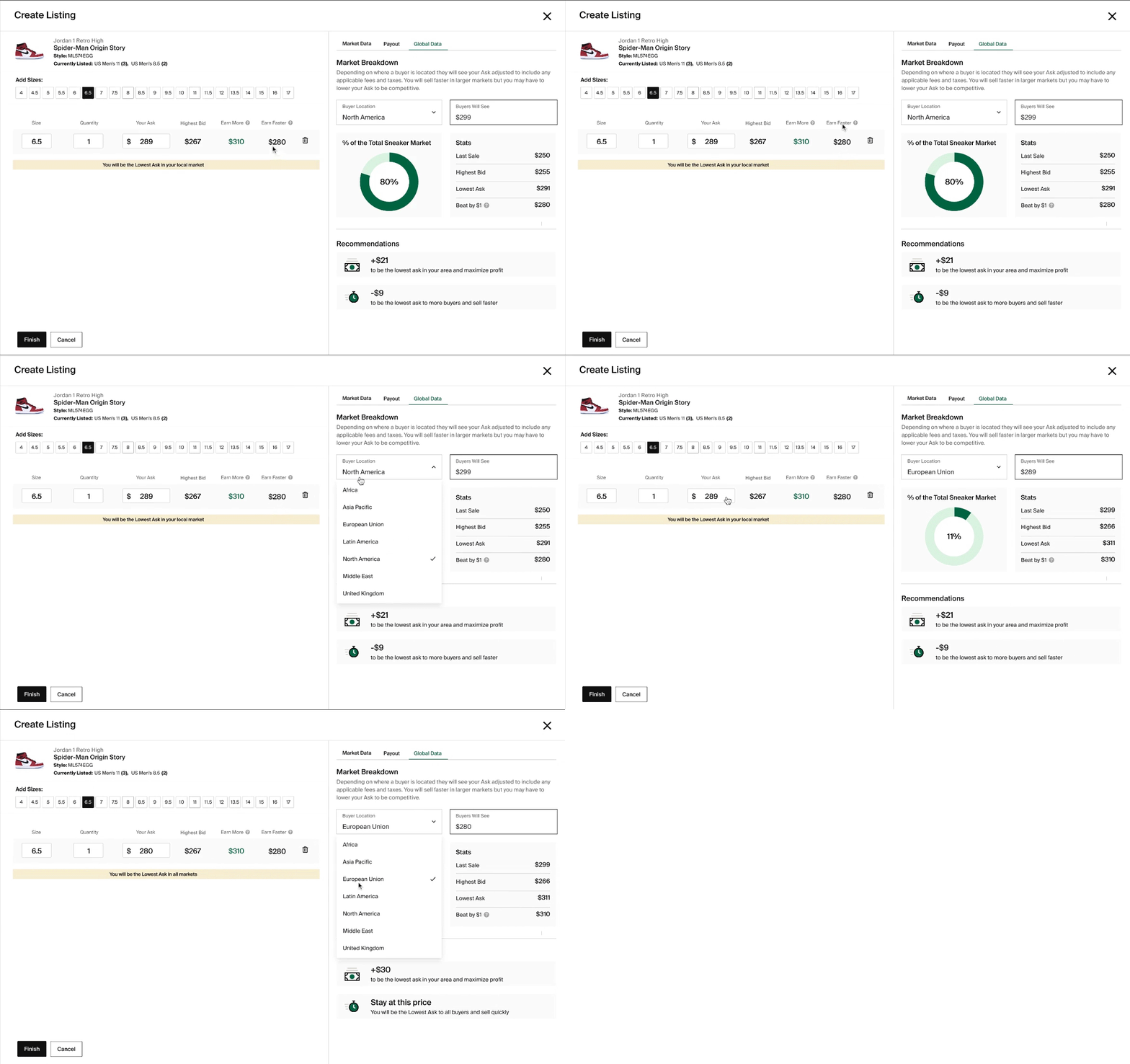
Design Version 1
The goal of the first design option was to give sellers maximum flexibility to explore how prices change in different markets. Sellers can choose different locations from a dropdown, and see how their Ask price will change as well as key data points such as the last sale price. The design also featured a pie chart that shows the size of the market so sellers can prioritize markets with more buyers.
I new concept introduced with both designs were pricing recommendations that allowed sellers to see where they need to price to become the lowest Ask locally (Earn More price) or in the United States (Earn Faster price.) The idea is that you can alway earn more money by selling your item locally since there are fewer fees and shipping costs. However, the United States has the largest number of buyers, so you can sell your item faster by being the lowest price in the United States.
The recommendations were shown in the same row where you are entering your Ask price so they are always within view even when you have a different panel open on the right side. They were also explained in more detail inside the panel, below the market breakdown.
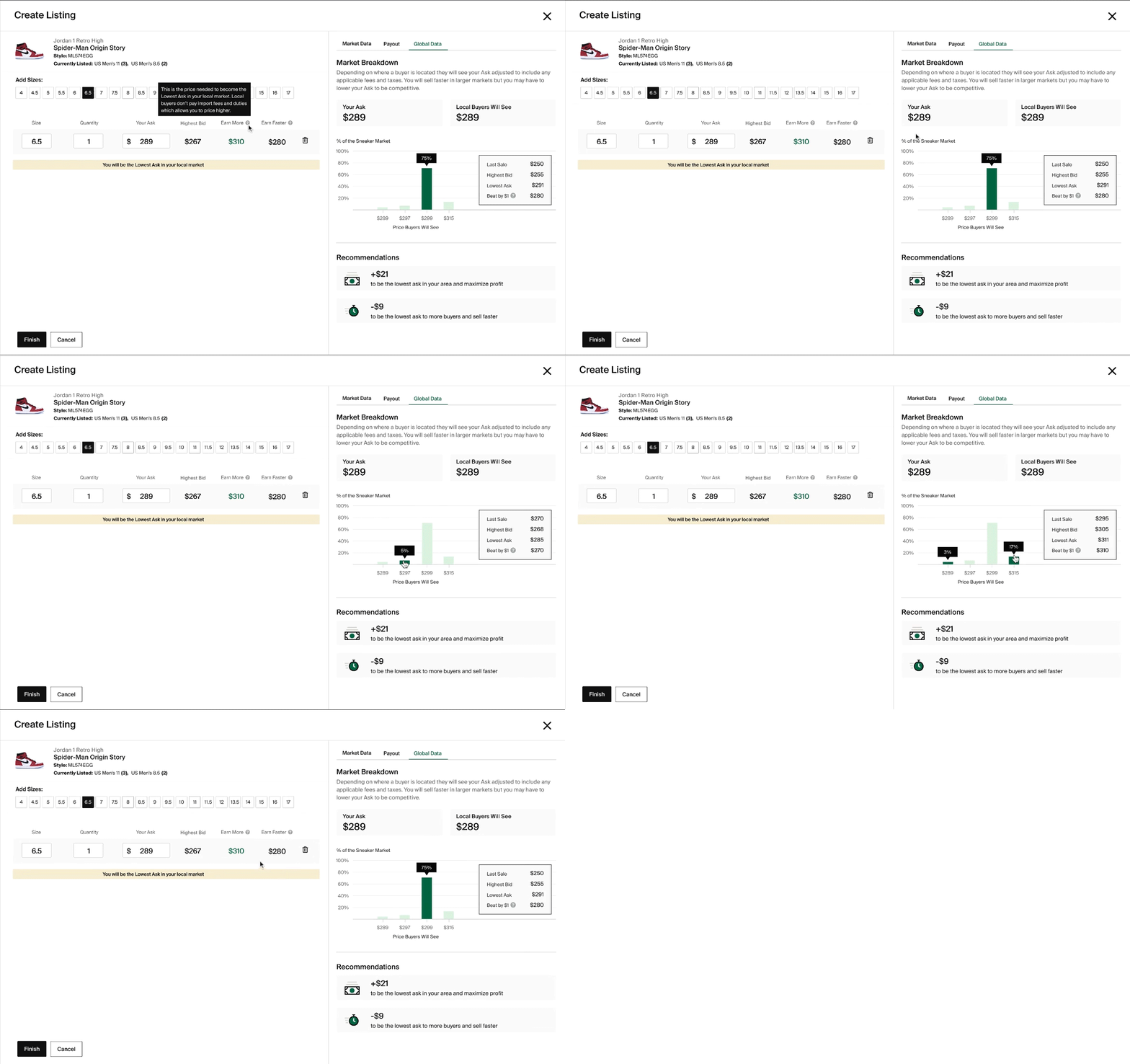
Design Version 2
While the first design gave sellers a lot of data to explore. However, if you are listing hundreds of different items per week, figuring out different pricing strategies for each SKU could be very tedious. The second design was intended to give sellers an overview of the entire world at a glance. Instead of selecting different locations from a dropdown, sellers can see which prices will be shown to the highest number of buyers in a bar graph and click to see high level stats. The pricing recommendations stayed the same from the first design.
User Testing Results
Both designs were shown to international power sellers who had previously experienced difficulty pricing their items. Participants completed a series of UX tasks and then asked if the designs mitigated their concerns around pricing.
Both designs successfully solved the key issues that international sellers had been facing regarding how to price their Asks for global buyers
All participants preferred the version 1 design over the version 2 design due to the Pie design’s level of detail and intuitiveness
The Earn More and Earn Faster pricing recommendations were not initially intuitive, but were appreciated when participants learned what these metrics represented
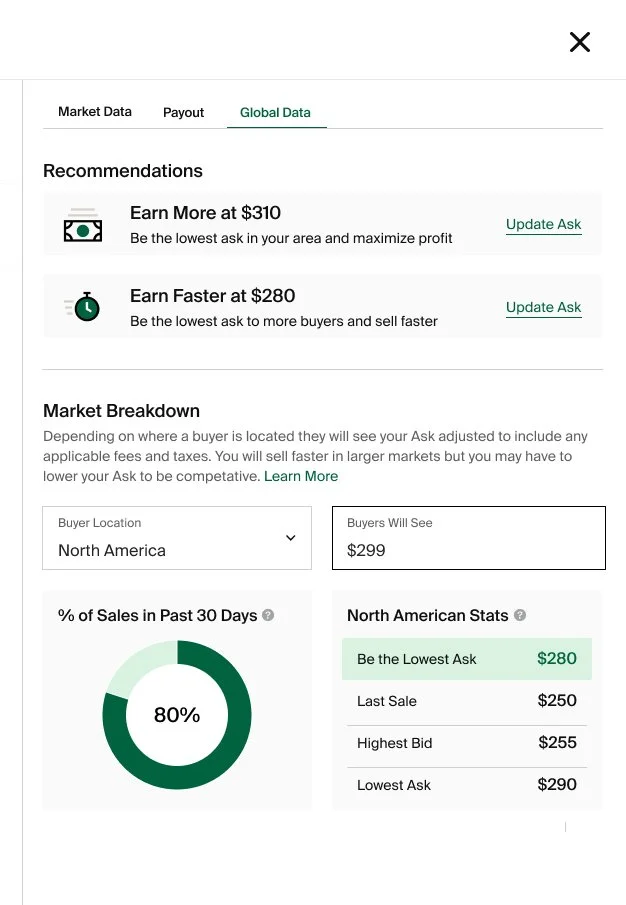
The feedback gave us a lot of actionable feedback that was incorporated into a version 3 design that highlighted the recommendations and explained them more clearly.
03 SolutionReality Check
Although our sellers really liked the level of detail provided by the proposed designs, the business was not comfortable disclosing that level of operational detail. The first version of the panel that was deployed, only contains the pricing recommendations. However, it has still been very successful with 60% of users viewing the recommendations.
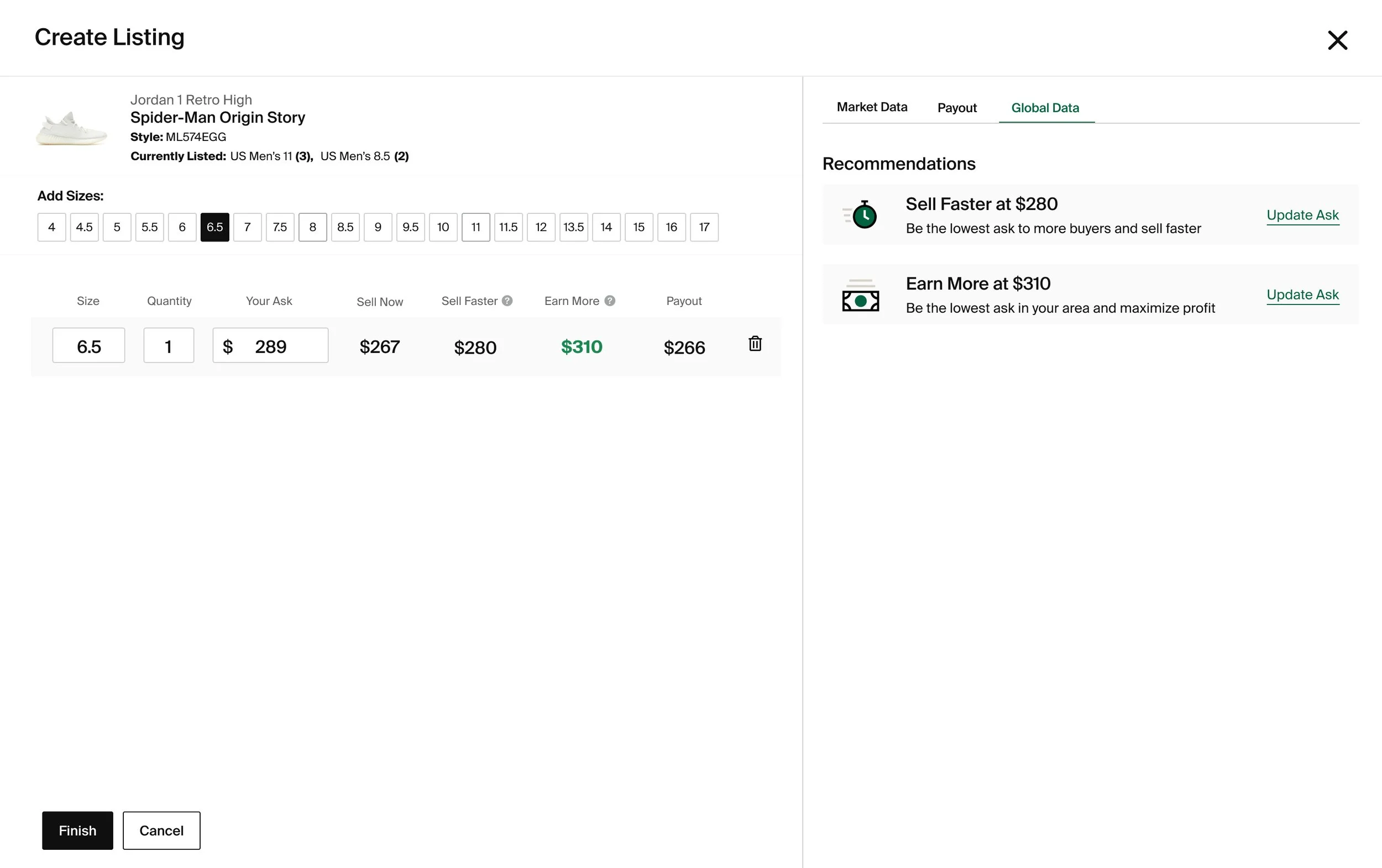
Simple but useful
Despite it’s simplicity, the first version was very successful with 60% of users viewing the recommendations. Additionally, the qualitative feedback from sellers was extremely positive.
“This is a game changer for me, I don’t have time to manually check the lowest asks with my US account every time - all I want to do is clearout inventory and be the lowest ask in the country, now I can.”
Power seller“Lastly, the new addition on the application that shows us how much of an asking price we should place to get our product sold faster is a great addition and is highly efficient for us to use.”
Power Seller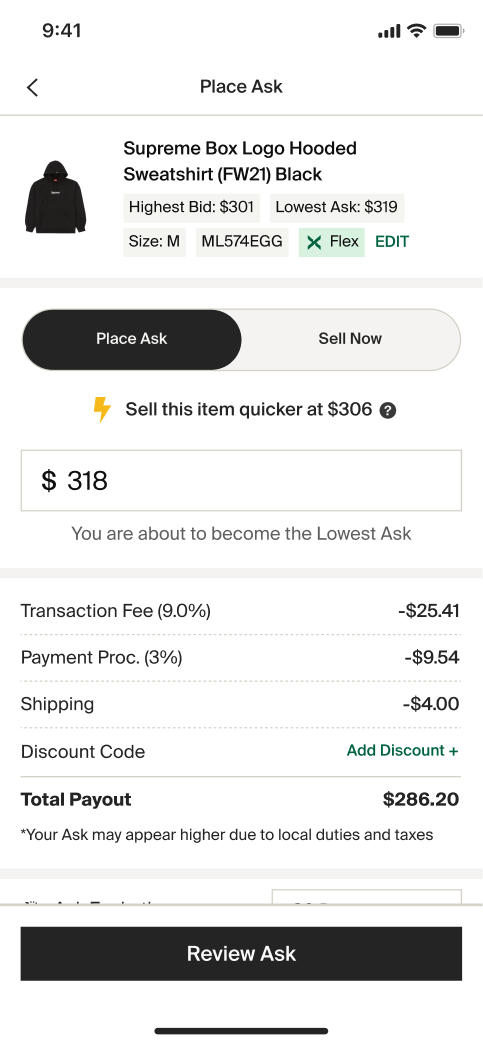
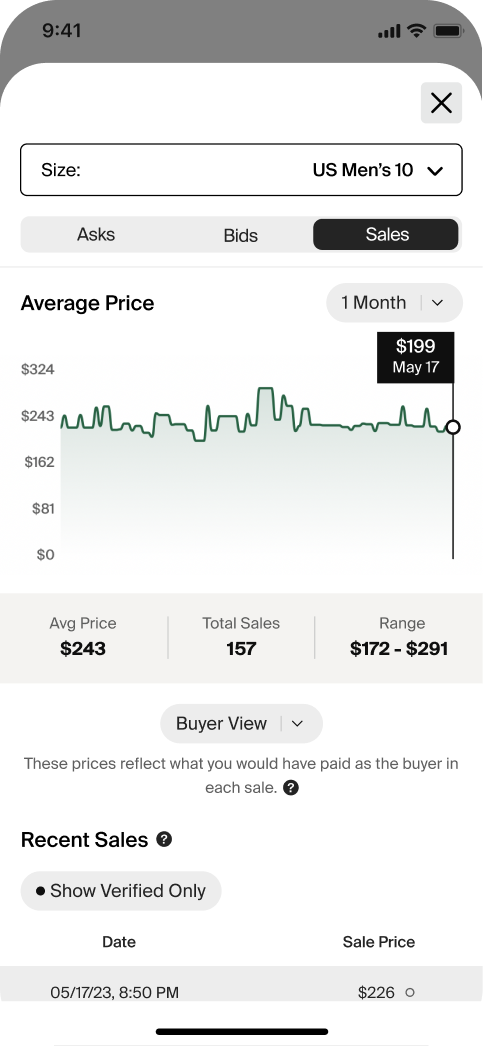
Versions 3, 4, 5…
After the success of the initial recommendations, we continued to iterate on way to make them more useful. We knew that to have the biggest impact, we need to make the recommendations available in our mobile selling flow which is used by casual sellers. We tested many versions from simple, text based nudges to more complex graphs and data tables.
Current State
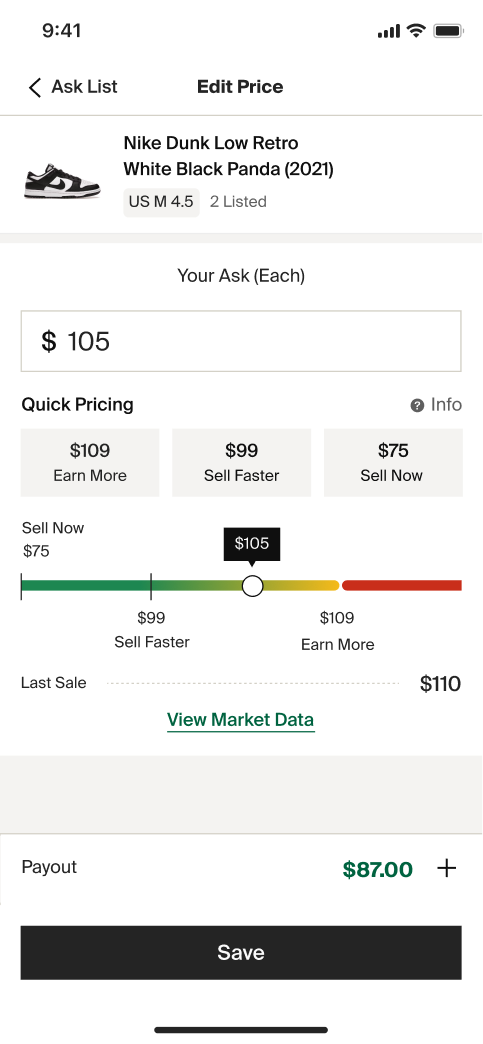
Today pricing recommendations have been added to all of our seller tools and the original “Earn More” and “Sell Faster” terms remain. Overtime the logic that powers these recommendations has become a lot more sophisticated. The value now take into consideration the sales history of this particular item as well as more complex global policy changes like tariffs.
We also introduced a visual representation of the values which gives sellers even more feedback. Pricing between Earn More and Sell Faster is considered a fair price but if you price above Earn More, you get a message that this item has never sold for that high.
05 ReflectionDesign less, listen more
This project has evolved over multiple years, multiple continents, and multiple US trade policies. Ultimately, we have been successful by listening to our sellers. We are privileged to have sellers that are generous with their time and feedback. By wading into the complexities and listening to their day-to-day challenges, we arrived at a solution that was a lot simpler than I envisioned in 2021.
A simple experience that users can understand quickly is a lot more likely to be used.
What I learned
Although we have made huge improvements, our current is still anchored on only two recommendations. In my dream state, sellers would be able to tell us their goals, for example how quickly they want to sell and we could adjust their price automatically to meet that goal.
What I would change
Today every seller-facing project considers pricing guidance. We now have pricing recommendations for multiple marketplaces including used items.
What came next